
What Is RMM and Why It Matters for Modern Business IT
Businesses today depend on technology for communication, productivity, security, and daily operations. When systems slow down, updates fail, or devices stop working properly, the impact reaches employees, customers, and revenue. That is why more organizations are moving away from reactive support and investing in a more proactive model built around RMM, or Remote Monitoring and Management.
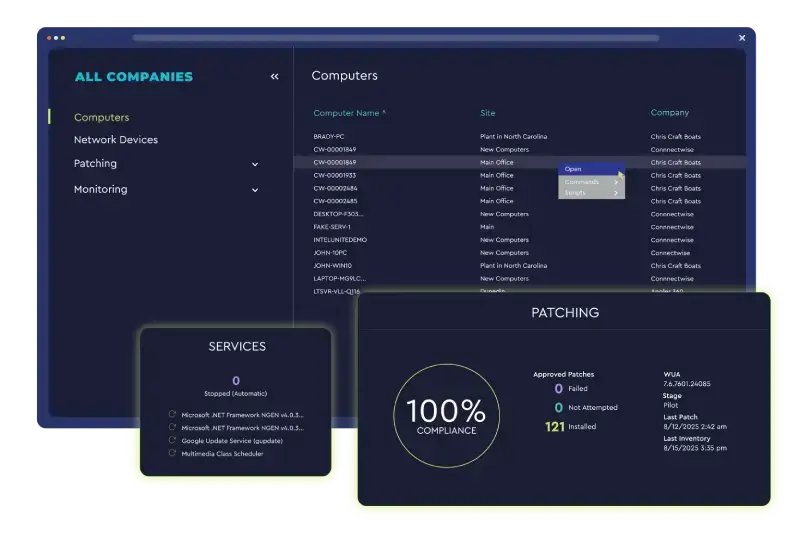
RMM is an operational framework that allows IT teams to monitor, manage, maintain, and support business technology environments from a centralized platform. Instead of waiting for users to report issues after something breaks, RMM helps detect problems early, automate routine maintenance, improve visibility across endpoints, and support faster action when something needs attention.
At Caperion, RMM is part of a broader managed IT support approach designed to help businesses reduce downtime, improve service consistency, and gain more control over their IT environments.
What Does RMM Mean?
RMM stands for Remote Monitoring and Management. In practical terms, it gives IT support teams the ability to keep an eye on servers, workstations, network-connected devices, and other critical systems from a central dashboard.
This includes monitoring system health, tracking alerts, supporting patching and updates, helping with maintenance tasks, and documenting support activity through structured workflows. For growing businesses, this creates a stronger and more efficient support model than relying only on manual checks or user-reported problems.
Why Traditional Reactive IT Support Falls Short
In many organizations, IT support is still reactive. A problem happens first, then someone opens a ticket, and only after that does troubleshooting begin. That approach creates familiar issues:
- Limited visibility into device health
- Slower issue detection
- More downtime
- Inconsistent maintenance
- Higher support costs
- Fragmented documentation
RMM helps solve these challenges by moving support upstream. Instead of acting only after a failure, support teams can identify warning signs earlier and respond with more consistency.
Key Benefits of RMM for Businesses
One of the biggest benefits of RMM is reduced downtime. When systems are monitored continuously, issues can often be identified before they affect users in a major way. That leads to faster response, fewer surprises, and more stable business operations.
Another major benefit is centralized visibility. Businesses with multiple users, many endpoints, or more than one location need a way to understand what is happening across their IT environment. RMM helps bring that information together in one place.
RMM also improves operational efficiency. Many support tasks can be completed remotely, including maintenance, software actions, patching, and routine follow-up. This reduces delays and allows support teams to work more efficiently.
A mature RMM service also supports automation. Repetitive tasks, maintenance steps, remediation actions, and monitoring responses can be streamlined through automated workflows. That reduces manual effort while helping improve consistency and service quality.
What Caperion RMM Helps Businesses Do
Caperion RMM supports a more proactive, documented, and scalable IT service model. Rather than functioning as just a monitoring dashboard, it helps create a support framework that combines visibility, action, and accountability.
Core capabilities include:
- Remote monitoring of endpoints and infrastructure
- Patch and update management
- Automated maintenance workflows
- Alerting and issue response
- Reporting and operational visibility
- Security-focused oversight
- Backup and recovery support workflows
- Centralized documentation of service activity
This model is especially valuable for small and medium-sized businesses that need dependable support without building an internal operations structure from scratch.
Why Automation Makes RMM More Valuable
Monitoring is important, but automation increases the value of RMM significantly. When issues can trigger predefined actions, support becomes faster and more standardized.
Examples include automated maintenance routines, policy-based actions, scripted remediation, and structured escalation. This helps reduce technician workload while improving response time and service consistency. For businesses, that means fewer avoidable disruptions and a stronger overall support experience.
Best Use Cases for RMM
RMM is especially useful for:
- Businesses with multiple endpoints or remote users
- Organizations with limited in-house IT resources
- Companies that need proactive support instead of reactive fixes
- Multi-location businesses
- Businesses where uptime and continuity matter
- Companies that want better visibility into IT operations
In each of these cases, RMM helps create a more stable and manageable technology environment.
Final Thoughts
RMM matters because business technology can no longer be supported effectively through a purely reactive model. Organizations need visibility, automation, documentation, and a support structure that helps prevent issues before they become larger problems.
Caperion RMM helps businesses monitor, maintain, and support their IT environments more proactively. The result is better uptime, faster issue response, more consistent service, and a stronger operational foundation for growth.
Frequently Asked Questions
What is RMM in IT?
RMM stands for Remote Monitoring and Management. It helps IT teams monitor and manage devices, systems, and infrastructure remotely from a centralized platform.
How does RMM reduce downtime?
RMM reduces downtime by identifying issues early, supporting proactive maintenance, and enabling faster operational response before problems escalate.
Is RMM useful for small businesses?
Yes. RMM is especially valuable for small and medium-sized businesses that need reliable IT oversight and support without a large internal IT team.
What makes Caperion RMM different?
Caperion RMM combines monitoring, maintenance, automation, reporting, and documented service workflows into a more complete support framework.